
Showing posts with label INTERESTING TRICKS. Show all posts

Friday, 22 March 2013

How To Hack Saved Password In Firefox ?


firefox hacks

In my previous post i had posted two tutorials on How to hack google chrome saved password ? and More simple way to hack google chrome saved passworod. In this post i will share with you guys how to view saved password in Mozilla Firefox web browser. This trick can be helpfull if you get your hands on someone computer maybe your friends and he has saved password for certain websites like gmail, facebook,yahoo etc then you can easily view his password with very simple and easy trick that i am going to share today. 

For demonstration purpose i have already saved a fake email password for facebook. But it will work on any website. So lets get started.

How to do ?

1. Open Firefox Web Broweser
2. Then Click on FireFox > Option > Option as shown in below picture
3. Then a POP Up box will appear, In that go to security and click on Show Passwords as show below.
4. Now click on website whose password you want to see ans click on show password as shown in below image. (Note: It will ask for confirmation so click on yes when dialog box appears)
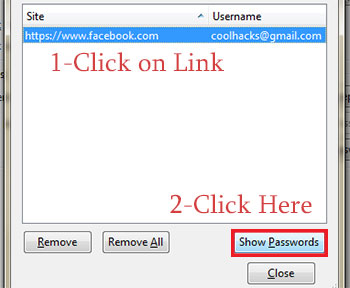
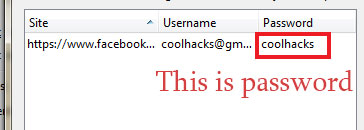
5. Done, You have hacked password of your victim with few simple steps. You can try this at school computer lab if someone have saved their password. 
Blocking Facebook On Your Computer


I had previously posted about Blocking And Unblocking any websites on your computer. In this tutorial i will teach you to specifically block facebook on your computer. This might be helpfull if you want to prevent students from using facebook in school and colleges or your employees in office. If you are parent and don't want you child to use facebook or any other particular site then follow simple steps given below. So lets get started.

How To Block Facebook ?

1. Go to Start > Programmes > Accesories
2. Then Right click on Notepad and Run it as administrator.
3. Now open host file by clicking on File > Open and locate to following address


     C:\WINDOWS\system32\drivers\etc

4. Then just below # 127.0.0.1 localhost paste folowing code


# Blocking Facebook
127.0.0.1 login.facebook.com
127.0.0.1 www.facebook.com
127.0.0.1 apps.facebook.com
127.0.0.1 blog.facebook.com

5. Now save the host file and done.
6. Open any browser and try to open facebook. It won't open. If facebook opens then you might have done somthing wrong. (let me know if you face any problem)


Blocking Other Website

If you want to block website other then facebook then change facebook address with whatever website you want to block. For example: to block google paste following code below # 127.0.0.1 localhost


# block google
127.0.0.1 www.google.com