Showing posts with label tricks. Show all posts

Wednesday, 23 November 2011

Call Any One From Any Mobile Number

Hi friends ! so many of our users had requested me to provide a tricks which unables them to Call Any One From Any Number .Today  i am very happy to say you that i have got a trick for that means you can do the same.I will not waste your time. Just follow simple steps and enjoy.

  • First of all open http://www.crazycall.net
  • Select The country Of Mobile Number From which you want to call(This number will be shown in victim's mobile).
  • Enter the Mobile Number which you want to show on your Enemie's Mobile.
  • Enter the Mobile Number of person(enemy) to call .
  • If you want to change your voice ,you can choose voice change means pitch change option otherwise leave it.
  • Enter on Get Me a Code
  • After that you will see Your Code along with a number .
  • Just dial the number first from your mobile and when asked enter the code you have just got.
  • Your phone will be redirected and thus enjoy.
  • Please note that this service is not free so balanced will be deducted from your mobile.


Please comment if you liked our post as your comments are our motivation.

Friday, 18 November 2011

How To Create A Google+ Page For Your Website , Business Or Brand

Google+ has now started introducing new features for business owners , webmasters , bloggers and internet marketers . Just recently , they have announced that now we can also create pages on Google+ for our blogs or our businesses . I think , nowadays , almost all the bloggers have official Facebook fan pages for their blogs , and Google+ pages are quite similar to Facebook fan pages , but the only difference is that both of them are on different social networking platform . Seems like Google is trying to make Google+ useful to all types of people around the world , with different professions . If you have a Google+ account , then you can also create a page on Google+ for your website , business , product or any other things . Now , I'm going to tutor you on how to create a page on Google+ ! All you need to do is to follow the simple steps mentioned below :-


* First of all , login to your Google+ account .


* After that , in the middle right side of your Google+ profile , you will notice a tab named " Create a Google+  Page " . Just click on it !


* After that , you will be redirected to a new page , where you will have to pick up a category for your Google+ page . If you are blogger , then just choose " Other " , as there are no any other category for websites .


* Then , you will have to pick up a name for your page , and type the URL of your website or blog . After filling up both the boxes , you will have to set up the privacy of your page that who can view your page . After that , agree their terms and policies , and click on " Create " !


* After that , choose a picture for your page , and add a few tags , so that users can easily recognize your page . Right after doing both the tasks , click on " Continue " !


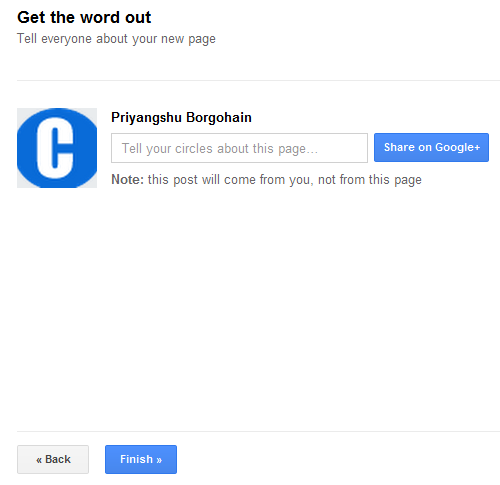
* Then , you can share about your new page with your circles ! You may also skip this step , and just click on " Finish " . You are now completely done !


I think Google+ pages is far better than Facebook fan pages , as the pages created on Google+ will have a high rank on Google search engine , and Google+ pages can be easily searched on Google by typing + followed by the next characters of the particular page . For example , you can search for +CrazyBlogWalker , which will result for our official Google+ page on Google SERPs . And this feature is known as Direct Connect , as it allows the users to get access to any Google+ page as per their wishes , easily through Google search engine . Well , I hope that this step by step tutorial of creating a Google+ page will certainly help many of you standing out there ! In the meantime , you may also add our official Google+ page to your circles , to do so , just follow the link mentioned below :-

Click here to add our page to your Circles !